Quick answer
A Standard tracker is yellow and is cleared when you register the car at a Pay 'n' Spray from early Chapter 3. An Advanced tracker is red: it pings the police when you slow down or stop, and only Randy's Chapter 3 jobs unlock a shop that can remove it.
The three tracker states
Every stolen car in GTA 6 falls into one of three groups. The WAiNK app shows the state on the car's scan, and the color is the shortcut everyone uses: none, yellow (Standard) or red (Advanced).
| State | Icon | Usually found on | What it does | How to clear it |
|---|---|---|---|---|
| No tracker | No icon | Older and cheaper cars | Nothing is transmitting | Moses in Port Gellhorn, Chapter 2. The first registration is free |
| Standard | Yellow | Mid-range cars | A basic tracker; it has to be cleared before the car is yours | Register at a Pay 'n' Spray from early Chapter 3. Registration clears it |
| Advanced | Red | Sports cars and supercars | Reports your position to the police when you slow down or stop | Finish Randy's Wish List, wait for his call, then use Pay 'n' Spray |
The table is the whole system in one place. The rest of this page is the detail behind the two tracker rows, and the mistakes that come from confusing them.
How to read the WAiNK scan
Open the phone with D-pad Up, open WAiNK, and hold R1 on PS5 or RB on Xbox while looking at the car. The scan works from a distance, so you can check a car before you touch it. Read the Tracker line, not the car's price or model name. The tracker state is what decides whether the car can be kept, sold or only used for a delivery.
Make the scan a habit. A ten-second check saves a long drive to a garage that will refuse the car, and it stops you from filling your only garage slot with a car you cannot register.
Standard tracker: the yellow one
A Standard tracker is the middle tier. It appears on ordinary, mid-range cars, and it is the first tracker the game lets you clear. From early Chapter 3, a Pay 'n' Spray can register a car with a Standard tracker, and the tracker does not survive the registration. You do not need Randy for this one, and you do not need the Key Cloner unless the car itself is keyless.
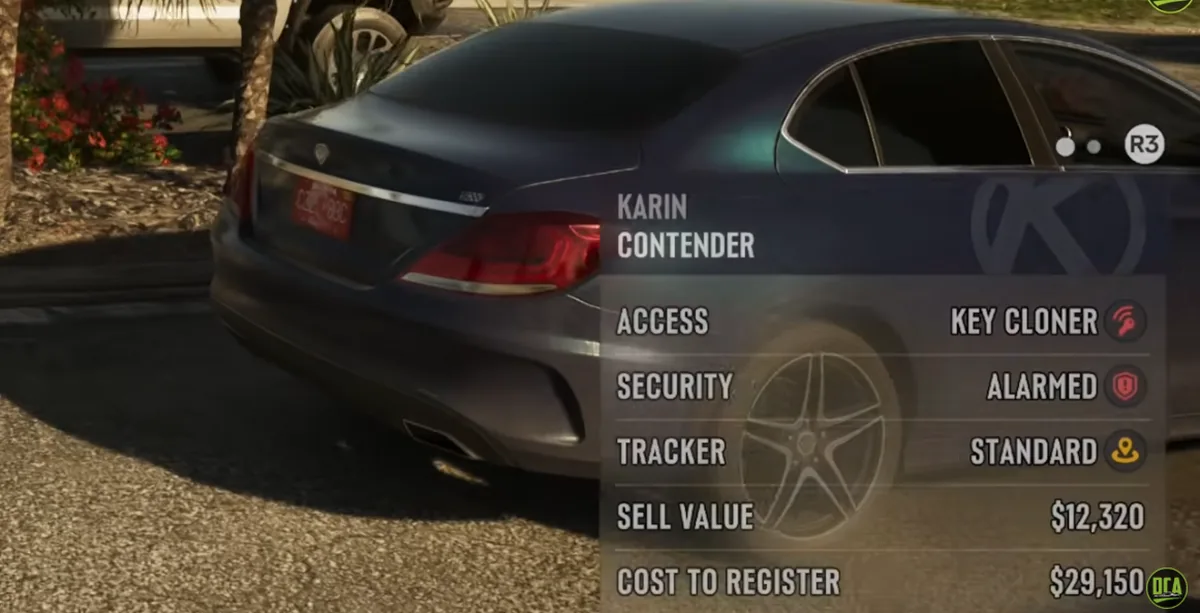
The open question is what the Standard tracker does while it is active. Some guides describe it as a basic device that mainly gates registration; others report that it can bring police attention. The Advanced tracker's ping is the behavior described consistently across guides, so do not assume a yellow car is harmless just because it is not red. Scan it, decide whether you can register it yet, and do not stop in it if you are unsure.
Advanced tracker: the red one
An Advanced tracker is the top tier. It appears on expensive sports cars and supercars, and it is the one that changes how you drive. The device reports the car's position to the police when the car slows down or stops. Keep moving and the pings stop; stop at a light and you have given the police a location. That is why the car cannot be parked and saved for later.
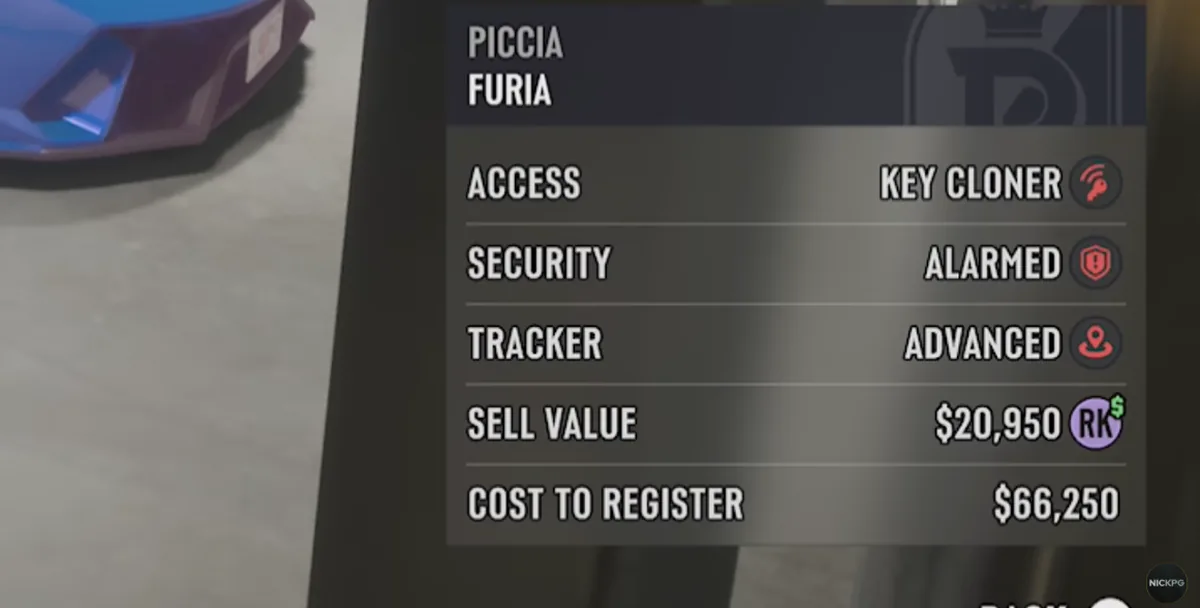
You cannot remove an Advanced tracker yourself, and you cannot register or garage the car while it is tracked. The only known route is Randy's Chapter 3 Wish List: deliver his high-end cars until he calls to say Pay 'n' Spray can handle Advanced Trackers, then take the car to a shop. The call is the unlock; the Key Cloner and the wish list are the road to it.
What the difference means before you steal
The color decides the next ten minutes of your game.
- No tracker: steal it, drive to Moses, register or sell. This is the easy tier.
- Yellow: you can keep it from early Chapter 3 at a Pay 'n' Spray. If you are not there yet, sell it or leave it; Moses will not take it.
- Red: the car is a Randy delivery or a liability. If you are not ready to drive it to a drop-off without stopping, leave it.
The worst outcome is a red car you cannot keep, cannot sell and cannot park. The second worst is a yellow car you drive to Moses and waste a trip on. The scan prevents both.
Common myths
- "Driving fast removes the tracker." No. Speed keeps the device quiet while you move. The tracker is still fitted, and the car still cannot be registered.
- "Moses can clear any tracker." No. Moses only registers untracked cars. A Standard or Advanced tracker is not his job.
- "Any Pay 'n' Spray can clear red from the start." No. Standard is an early Chapter 3 service. Advanced waits for Randy's call.
- "The color is cosmetic." No. The color is the unlock condition. A red car and a yellow car with the same model can have different routes.
- "It is a bug." It is a story gate. The refusal is the game telling you the service is not open yet.
Which cars have which tracker?
The short answer is that the scan is the only reliable source for a specific car. The pattern guides report is: older and cheaper cars tend to have no tracker, mid-range cars tend to have a Standard tracker, and sports cars and supercars tend to have an Advanced tracker. Randy's wish list is full of the last group, which is why the Key Cloner and his deliveries matter together.
Do not buy a car because a video said it was "tracker-free". Spawns and models vary, and a patch can change a car's state. Scan the car in front of you.
We considered a separate "cars without a tracker" list and left it out. A model-by-model list goes stale with every patch, and spawns vary by save, so the in-game scan is the only reliable answer for the car in front of you.
Sources and updates
This page is based on in-game prompts, player reports and published guides from the first week of GTA 6 (19–26 November 2026). The Standard tracker's police behavior is disputed between guides, and the page says so. If a patch changes the rules, the in-game scan is the final word. Send a correction through the contact page.
From the road
Comments
Got past this step, or stuck on it? Say which car and what the game did. Plain text only, no links.
Site owner
No comments yet. If you have removed one of these trackers, say which car and which step worked.